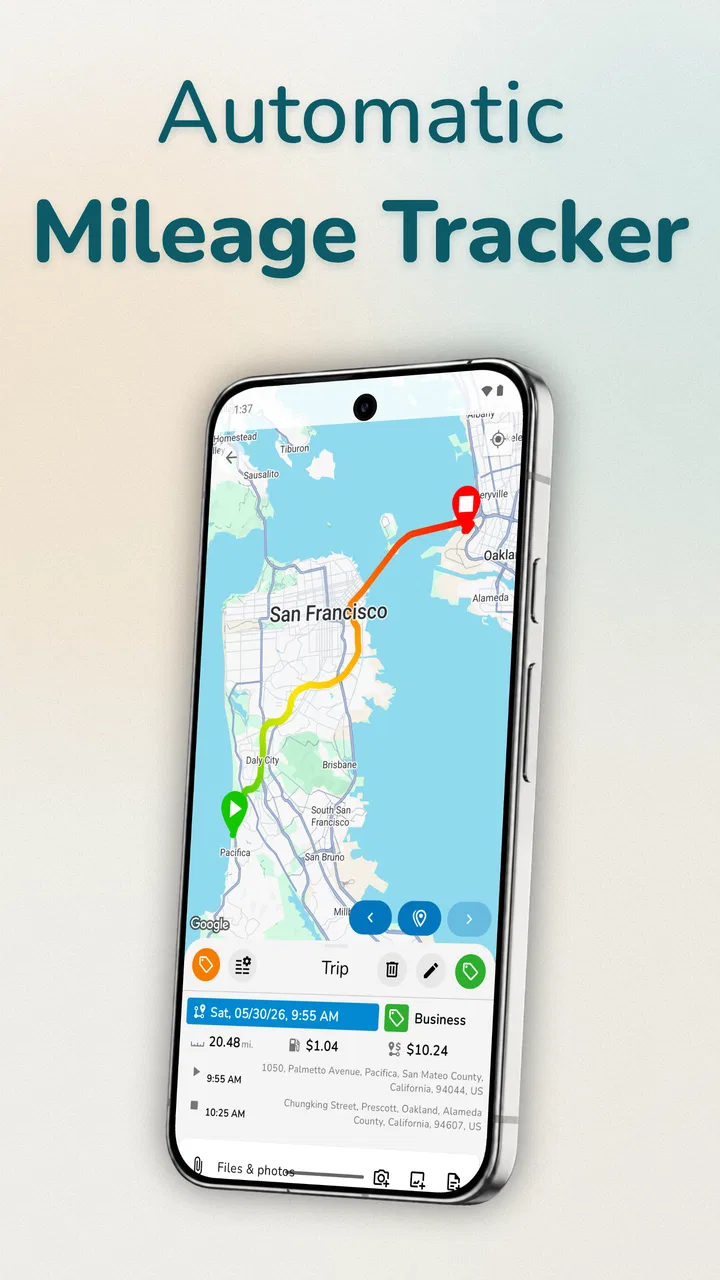
Mileage Tracker & Vehicle Log
- 4.2
- Rating
- 500.00K
- Installs
- Free
- Price

 Analysis by App-foxy
I find Mileage Tracker & Vehicle Log most useful when I treat it as a quiet record-keeping tool rather than a complete car-management system. Its purpose is clear: help me keep a business mileage log that can support reimbursement or tax-deduction paperwork. That narrow focus is also its main strength. Instead of turning every drive into a complicated project, it gives me a place to build a consistent record while the trip is still fresh in my mind.
After spending time with the app, my overall view is positive but practical. It is a good fit for someone who regularly drives for work and wants something more dependable than scattered notes, calendar entries, or a spreadsheet updated at the end of the month. It is less convincing for people who want detailed vehicle maintenance, fuel-cost analysis, route planning, or a polished all-in-one driving assistant. The real value here is disciplined mileage documentation, not broad automotive features.
What the app does well in everyday use
The first thing I appreciate is how directly the app addresses a common administrative problem. Business mileage is easy to forget because the driving itself feels routine. A quick trip to a client, a supply run, or a visit to another work location may seem insignificant on its own, but a collection of missed journeys can make reimbursement records incomplete. A dedicated mileage tracker encourages me to record those trips as part of the drive rather than reconstructing them later.
You May Also Like

 Google Keep - Notes and lists
Google Keep’s Quiet Growth Shows the Appeal of Simpler Notes
As mobile work gets busier, Google Keep keeps winning a simple contest: capture a thought quickly, find it later, and get on with the day.

 Blood Strike: 2.5 Anniversary
Blood Strike’s Loadouts Turn Every Drop Into a Tactical Gamble
A close look at Blood Strike’s custom loadouts: how fast access to signature weapons reshapes its battle royale rhythm, rewards preparation, and narrows the gap between fights.

 Pandora - Music & Podcasts
Pandora’s Music Is Easy to Start, but Harder to Recover
Pandora’s strength is its low-effort path from a seed to a station. Its weak spot is how much confidence it asks you to place in connection, setup, and quiet recovery.

 8 Ball Pool
 Is Built on Rivalries, Rematches, and Routine
A close look at the rivalries, rematches, shared routines, and unanswered safety questions that turn a quick pool match into a persistent mobile community.

 Samsung Music
’s Quiet Strength Is Playing What You Already Own
Its reach comes less from spectacle than from dependable access to a personal library. That simplicity is both the app’s strongest retention engine and its ceiling.

 AccuWeather: Weather Radar
AccuWeather Review: A Quick, Clear Forecast for Everyday Decisions
For everyday plans, the best forecast is the one you can understand quickly. AccuWeather makes rain timing, radar, and local conditions easy to act on, with a few trade-offs.
More From Our News Desk



That timing matters. If I wait until the weekend, I may remember the destination but not the exact reason for the trip, the route I took, or which journeys were personal. A focused log makes it easier to separate work-related driving from ordinary errands while the context is still obvious. I would use it immediately after a business trip, then review the entries before submitting an expense report or preparing tax records.
The app comes from autolog.app and sits in the Auto & Vehicles category, but I would not judge it by the standards of a navigation app or a workshop companion. Its job is administrative. The strongest experience comes from treating each entry as a small piece of documentation rather than expecting the app to manage every aspect of ownership.
Its store summary highlights reimbursement and tax deductions, and that tells me who the product is really for: employees seeking mileage reimbursement, freelancers, contractors, salespeople, consultants, and small-business owners who use a personal vehicle for work. For these users, a reliable log may be more valuable than a long list of unrelated car features.
A realistic workday workflow
Imagine a self-employed technician who starts the morning at home, visits two customers, stops at a supplier, and returns home. The useful workflow is not to rely on memory at the end of the day. Instead, each work-related journey can be captured as it happens, with the purpose kept clear enough to distinguish it from a personal stop. At the end of the week, the driver has a chronological record to check rather than a blank page and a vague recollection.
That scenario also reveals an important habit: I would keep business and personal travel mentally separate from the beginning. Even a good tracker cannot decide whether a mixed-purpose trip should be reimbursed or deducted. The person using it still needs to apply the rules relevant to their employer or tax situation. The app can support organization, but it should not be treated as tax advice.
For a manager reviewing mileage claims, a consistent log is easier to understand than a collection of handwritten notes. For an independent worker, it can reduce the stress of preparing records after several busy weeks. The benefit is modest but real: fewer forgotten journeys and less end-of-period reconstruction.
Why a dedicated log beats improvised alternatives
I have tried the usual alternatives in principle: writing distances in a notebook, adding reminders to a calendar, or maintaining a spreadsheet. Each can work, but each depends heavily on personal discipline. A notebook is quick but difficult to search and summarize. A calendar preserves dates and appointments but may not explain the actual mileage. A spreadsheet is flexible, yet it asks me to design the structure, maintain it, and remember to open it at the right moment.
Mileage Tracker & Vehicle Log is more focused than those options. The advantage is not that it magically solves every reporting problem. The advantage is that the app starts with the assumption that I am recording vehicle use, so the workflow feels more appropriate than adapting a general-purpose tool.
There is a trade-off, though. A spreadsheet can be customized for unusual company rules, multiple reimbursement rates, project codes, or detailed accounting categories. A dedicated app may be faster for routine logging but less adaptable when an organization demands a very specific format. I would choose this app for straightforward personal record keeping and consider a spreadsheet when the reporting process is complex or shared with an accounting team.
Small habits that make the log more reliable
The most useful improvement does not come from tapping faster; it comes from creating a repeatable routine. I would record the business purpose in words that make sense several weeks later, rather than relying on a vague label such as “meeting.” “Client visit” or “supplier pickup” is more useful when reviewing a long list. The exact wording depends on the user’s work, but the principle is the same: write for the future version of yourself.
I would also review entries at the end of every workweek. This catches duplicate trips, personal journeys accidentally included in the business total, and missing context before the details disappear. A short review is much easier than trying to rebuild an entire month in one sitting.
Another practical tip is to treat the app as the primary record, not as a backup for notes kept elsewhere. Splitting trips between a paper notebook, text messages, and the app creates the same uncertainty the app is meant to remove. If a journey matters for reimbursement, I would put it in the log immediately and use any supporting documents separately.
These habits are not flashy features, but they are where the product becomes genuinely useful. Mileage tracking is mostly a consistency problem. The app can make consistency easier, but the user still needs a routine.
Where the experience may feel limited
The focused design can also feel restrictive. Someone looking for a complete vehicle diary may want fuel purchases, maintenance schedules, repair history, insurance reminders, depreciation calculations, or trip planning in the same place. I would not choose this app expecting those areas to be covered simply because it belongs to the automotive category. Its identity is much closer to an expense-recording tool than a digital garage.
There is also a human-effort limitation. Any mileage log is only as accurate as the entries behind it. If I forget to record a trip, enter the wrong purpose, or combine several journeys without enough detail, the final record may still be incomplete. A dedicated app reduces friction, but it cannot remove the need for attention.
That is especially important for people who drive frequently. A professional driver with many short stops may find manual logging tiring if every journey requires attention. In that situation, a solution built around more automatic capture might be more comfortable, provided it matches the person’s privacy preferences and reporting needs. I would not recommend choosing any tracker solely because it promises convenience; the final records still need to be understandable and acceptable to whoever reviews them.
The app also includes optional purchases ranging from $0.99 to $399.99 per item. That wide range means I would check the purchase screen carefully before committing to anything beyond the free starting point. The app itself is free, but “free” does not mean every possible function or upgrade has no cost. For a simple mileage log, I would first establish whether the basic workflow meets my needs before paying for extras.
Who should use it and who should look elsewhere
I think it is particularly well suited to people who drive their own vehicle for occasional or regular work trips and need a clear personal record. A freelancer who visits customers, an employee who submits mileage claims, or a small-business owner who wants to organize vehicle use can all understand the purpose quickly. The Everyone content rating also makes it broadly approachable for general users rather than a niche professional audience.
The app has been available since March 31, 2012, and its continued presence gives it the feel of an established utility rather than a brand-new experiment. Its current version is 4.1.10, and it supports Android 8.0 and later. That compatibility is worth checking before installation, especially on an older phone. On a supported device, the main question is less about novelty and more about whether the logging method fits the user’s routine.
The audience should be more cautious if they need formal fleet management. A company managing many vehicles, several drivers, or detailed dispatch information will probably need a system designed for shared administration. Likewise, people who want live navigation, fuel optimization, or mechanical reminders should compare it with apps built specifically for those jobs.
I would also hesitate to recommend it to someone who rarely drives for work. If there are only a handful of relevant trips each year, a simple spreadsheet or employer-provided form may be enough. The dedicated app earns its place when the number of trips makes informal tracking unreliable.
How the rating and adoption fit my impression
The app holds an average rating of 4.2 from around 8,100 ratings, with more than 500,000 installs. Those figures suggest that many people find the basic idea useful, while the rating also leaves room for individual preferences and frustrations. I would read that combination as a sign of a practical app with a clear audience, not as proof that it will suit every driving pattern.
There are also 369 written reviews, which is enough to show that users have engaged with it beyond a quick installation. Still, I would focus on whether those experiences resemble my own needs. A person logging a few business trips each week is evaluating a different product from someone trying to manage a large fleet or automate every journey.
What matters most to me is that the app’s promise is easy to test. I can install the free version, try recording real work trips, and see whether the process feels natural before building my entire record around it. That trial period is important because convenience is personal: one driver may find the workflow reassuring, while another may consider every manual step an interruption.
Questions I would settle before relying on it
One question is whether it can replace official tax documentation. My answer is no: I would use it as an organized mileage record, then check the requirements of my employer, accountant, or local tax authority. A log can make supporting information easier to maintain, but acceptance depends on the rules that apply to the claim.
Another question is whether it is suitable for mixed personal and business driving. Yes, it can be useful for that situation, but only if I classify trips carefully. I would avoid assuming that every journey connected to a workday qualifies automatically. A personal detour or combined trip may need separate treatment, so accurate descriptions matter.
Users may also wonder whether a free app is enough. It may be, particularly for someone who wants a straightforward record and does not need advanced extras. Because in-app purchases are available, I would inspect what is included before developing a workflow that depends on a paid function. Starting with a small real-world test is safer than assuming the free tier will cover every reporting need.
Finally, I would ask whether it replaces a spreadsheet. For simple individual tracking, it can be more convenient and less intimidating. For custom calculations, shared access, or a company-specific approval process, a spreadsheet or dedicated business platform may remain the better choice. The right comparison is not “which tool has more features?” but “which tool produces a complete, reviewable record with the least effort?”
My final recommendation
My verdict is that Mileage Tracker & Vehicle Log is a sensible choice for people who need a focused business mileage record and do not want to build their own system. I like its clear purpose, its usefulness in reimbursement and tax-preparation workflows, and the way it encourages recording trips before memory becomes unreliable. The strongest results come from pairing it with a weekly review and precise descriptions of why each journey happened.
I would not present it as a universal car app. It is not the right choice for someone seeking comprehensive maintenance management, sophisticated fleet controls, or a fully automatic driving assistant. Manual consistency remains part of the deal, and the presence of optional purchases means I would review costs before depending on upgraded functions.
For the right user, those limitations are acceptable because the app does not need to do everything. It needs to help turn everyday work driving into an organized record. With a free entry point, an Everyone rating, support for Android 8.0 and later, and a long-running presence from autolog.app, it is worth trying if mileage paperwork is currently handled through memory or scattered notes. I recommend it most strongly to independent workers and employees who want a simple, repeatable log rather than a full vehicle-management suite.
In short, Mileage Tracker & Vehicle Log succeeds by staying close to a real administrative need. I would use it when the priority is remembering, separating, and reviewing work mileage. I would skip it only when my requirements extend well beyond that focused job.
FAQs for Mileage Tracker & Vehicle Log
01What is Mileage Tracker & Vehicle Log used for?
Mileage Tracker & Vehicle Log is designed to help users keep track of their vehicle mileage, fuel expenses, and maintenance records. It is especially useful for people who need to track mileage for business purposes, ensuring accurate reporting and potential tax deductions. The app simplifies logging trips and expenses, providing detailed reports.
02Is the app compatible with both Android and iOS devices?
Yes, Mileage Tracker & Vehicle Log is available for both Android and iOS devices. Users can download the app from the Google Play Store for Android and the Apple App Store for iOS. It ensures a seamless experience across different platforms, making it convenient for all users.
03Does the app require an internet connection to function?
While Mileage Tracker & Vehicle Log can record trips and log data offline, certain features like data backup and synchronization across devices require an internet connection. Users can comfortably use the app offline and only connect to the internet when they need to update or back up their data.
04What kind of data can I track with this app?
The app allows you to track various data points, including mileage, fuel consumption, and vehicle expenses. Users can log trip details, categorize expenses, and set reminders for maintenance. This comprehensive tracking helps in managing vehicle-related costs effectively and provides insights into vehicle usage patterns.
05Is my data safe and private in Mileage Tracker & Vehicle Log?
Mileage Tracker & Vehicle Log prioritizes user data privacy and security. The app employs encryption and secure storage practices to protect your information. Additionally, users have control over data backup and can choose to store their information locally or via secure cloud services provided by the app.
Pros
- Seamless integration with GPS for accurate tracking.
- Intuitive user interface makes navigation simple.
- Supports multiple vehicle tracking simultaneously.
- Offers detailed reports for expense analysis.
- Customizable categories for personalized tracking.
Cons
- Limited free version features may require upgrades.
- Occasional GPS signal issues affect accuracy.
- Does not support all vehicle types uniformly.
- Requires manual entry for some data points.
- Notification settings can be overwhelming.

Mileage Tracker & Vehicle Log
Gallery